

Maestro vs. My Finale-to-MuseScore Converter: An Honest Comparison
by Don Chapman
Right on the heels of my Musescore to Finale conversions, I find out that somebody has created a Finale clone: Maestro.
What fantastic news for those (millions?) of us left stranded by MakeMusic when they discontinued the music engraving industry standard that had been going since 1988 (I was in college when it came out and remembered how amazing it was!)
People are terrified that one day their Finale install will no longer work with new Windows/Mac updates. Or if they purchase a new computer, they’ll no longer be able to authorize their software (MakeMusic says you will be able to authorize Finale on a new computer “indefinitely.”)
I’m not scared as I’m still using Finale 2000 – 26 year old software that does not need to be authorized (I don’t think that technology even existed back then!) If Finale 2000 one day won’t work on Windows 37, my techie friend told me to just create a Windows 11 virtual environment that will run it so I figure I’m good as long as I live.
So it’s a huge relief to the Finale community that there is new, working, FREE software that will open Finale files – even my ancient .mus format! Download it it for Windows and Mac.
Maestro appears to be updated every day – and multiple times every day – so it’s exciting to see the quick progress.
This got me thinking: maybe I’m doing an unneccesary step in converting my Finale files to MuseScore. Why not see if I can just open the Finale .mus files on my Hymncharts server and display those?
So I downloaded Maestro and tried it myself.
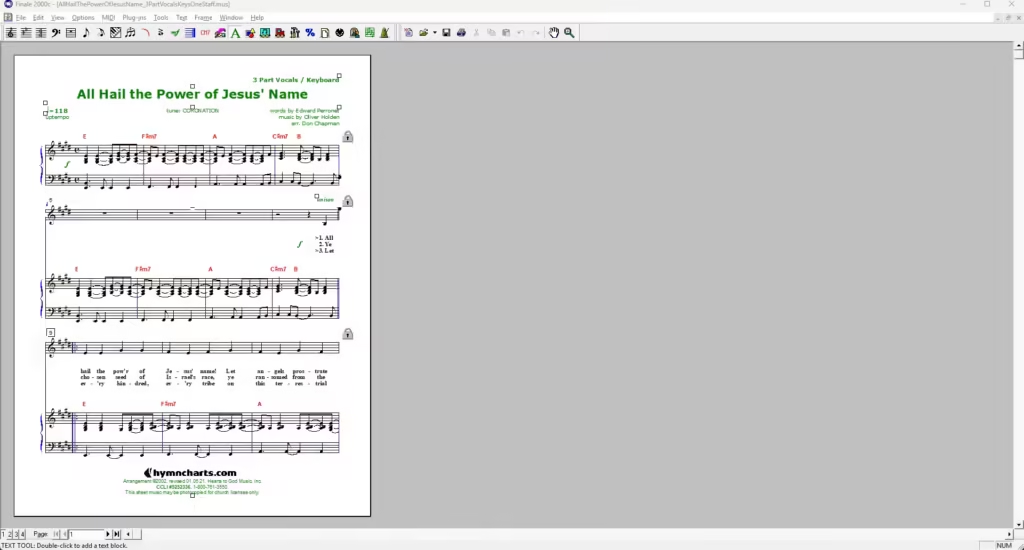
Here’s how my original Finale file looks opened in Finale 2000:
Here’s how it looks opened in Maestro:
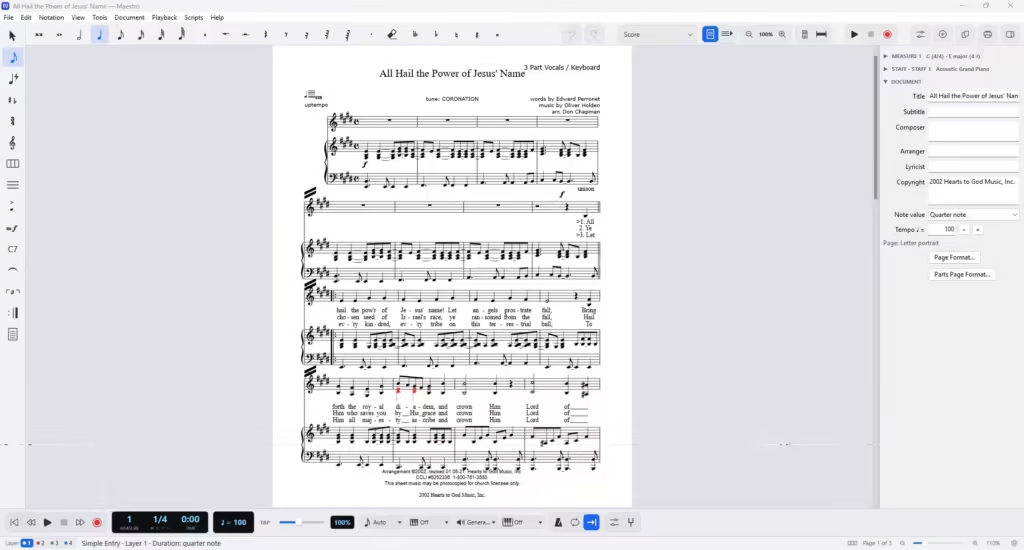
Not that great – and not much better than an XML export! The raw data (notes and lyrics) are there, but fonts and spacing are completely off.
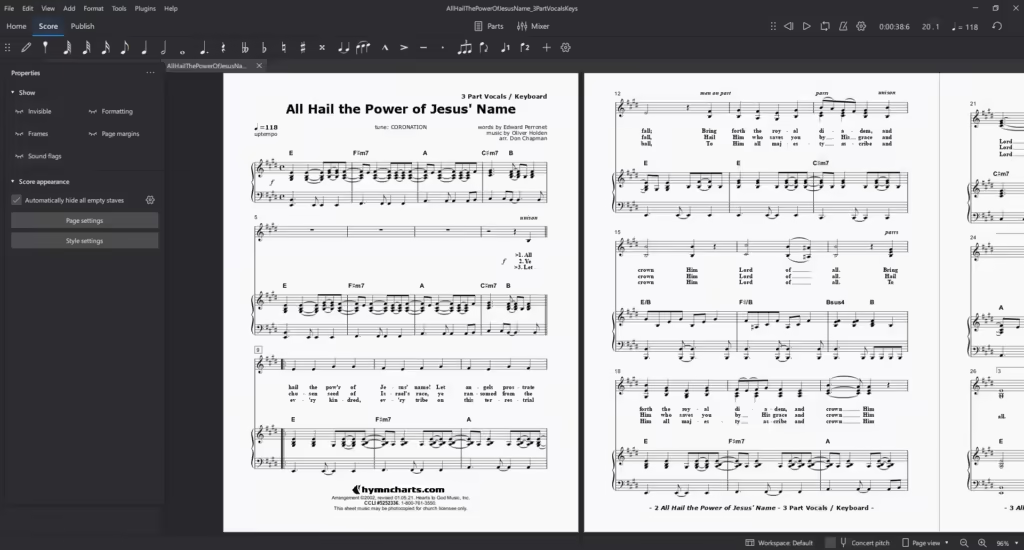
And here’s the file converted by my vibe-coded software and opened in MuseScore – nearly perfect:
Here’s something most of us Finale users never knew (I sure didn’t). A Finale file doesn’t contain a picture of your music. It’s more like a recipe: the notes, durations, lyrics and chord symbols, plus a bunch of proprietary layout instructions (where each system and page breaks, how far apart the staves are, how wide each measure is). Every time you open the file, Finale “cooks” the page from scratch using its own engraving engine, the one MakeMusic spent over 30 years perfecting.
Finale is gone, and so is its kitchen. Anybody who wants to open a Finale file has to read that recipe and cook the page themselves.
1. What Maestro is doing.
Maestro reads the recipe and then draws the music with its own brand-new engine and its own spacing rules. That’s a gigantic task for one small team (Scoring Notes reports it’s being built by a group of Italian musicians who are also developers), and they’re doing it for EVERY Finale file from every user in the world: orchestral scores, guitar tab, percussion and everything in between. They’re fixing things daily, but they’re just getting started.
And for my ancient files, a couple of things just aren’t there yet. According to Maestro’s own website, chord symbols don’t come across from .mus files yet. I’ve always had chords in my sheet music that match my chord charts, so that’s kind of a dealbreaker! Scoring Notes also reports that files from Finale 2000 (my version) through 2006 lose layout information.
2. What my converter is doing.
My vibe-coded converter (built with ChatGPT) reads the same recipe, but it doesn’t try to invent a new kitchen. It hands everything to MuseScore, which has a world-class engraving engine that’s been refined for nearly 20 years by a huge community. Then my software measures what MuseScore drew and keeps nudging things (lyric spacing, fonts, dynamics, measure widths, chord placement) until it matches my original Finale layout.
3. Why mine works better for me.
Simple: it only has to handle MY files. Every time I converted a new song and found a problem, CODEX fixed it, and that fix became a permanent rule for every song after it. My logo, my footers, my chord fonts, my choir layouts, my lead sheets. It’s been tuned to my 20+ years of Hymncharts arrangements and nothing else.
Maestro has to please everybody. My converter only has to please me. 🙂
So I’m sticking with my workflow: convert to MuseScore, upload, and let my transpose feature do its thing. As a bonus, my customers get a MuseScore file they can open and edit in a free, popular program used by millions.
And I’m still rooting for Maestro! If you’re one of the stranded Finale users with a hard drive full of files, download it, try it and keep an eye on it. At the rate they’re updating, it may look completely different in six months.
Bottom Line: Maestro is a terrific free lifeline for Finale users, but for my own sheet music, a converter built just for my files wins.
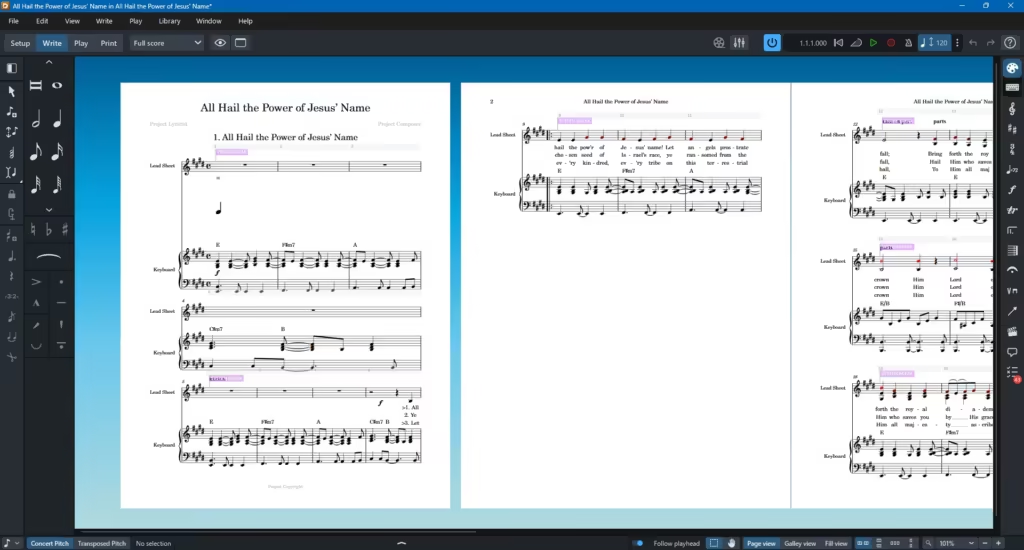
Update 10.20.26: I read on a Dorico Facebook forum that “Dorico & MuseScore have improved MusicXML import since two years ago. Both still need work.” So I tried it. Here’s the result of and XML export from Musescore opened directly in a fresh install of the free Dorico SE. Literally horrific. I was thinking of making my arrangements available as XML but after this, no way – it’s not even retaining my copyright info!

43 Million Streams



2 Comments. Leave new
Thanks for the honest side-by-side, Don. Your “recipe vs. the cooked page” point matches what we see from the other direction: MusicXML carries notes, durations, lyrics and chord symbols, but engraving decisions are left to whichever app opens it (your Update 10.20.26 note about copyright info going missing in Dorico is a good example). Disclosure: we’re the StemTab team, and StemTab exports editable MusicXML drafts from audio (https://www.stemtab.app); we tell people to expect exactly that and to re-lay out the page in MuseScore. Does your converter keep the Finale chord-symbol positions or recalculate them?
I asked Codex about chord positions and here’s what it said: “It preserves each chord’s musical position—the original staff, measure, and beat—but rebuilds its visual placement in MuseScore. The converter reads Finale’s .mus and .musx files directly and creates editable MuseScore files, without MusicXML as an intermediary.
For chord placement, it combines MuseScore’s spacing with engraving rules I’ve built into the converter, including consistent chord height and alignment. It also works to retain the original page and system layout. It doesn’t currently reproduce every manual horizontal or vertical nudge from Finale, or every custom adjustment within a chord suffix.
So the distinction is between keeping where the chord belongs in the music and reproducing its exact position on the printed page. The first is preserved; the second is reconstructed and still needs visual review.”