
HUGE MuseScore News: Instant Transposition Is Coming to Hymncharts!
by Don Chapman
Two years ago, on August 26, 2024, MakeMusic announced that it was discontinuing Finale and ending its development.
On September 23, 2024 (nearly two years ago to the day!) I wrote my “R.I.P. Finale” blog post. A comment from James B. became the deciding factor in my choosing MuseScore over Dorico:
If MuseScore is easier for ordinary folk to pick up and learn, then I would think that would be where you would be of the most help for your users.
The free aspect is also helpful to smaller churches that operate on small budgets, who use your scores.
Great advice!
But I faced one enormous problem: How on earth was I going to turn more than 6,000 pages of Finale files into MuseScore files?
Simply importing a Finale XML file didn’t work – the notes and lyrics are there but the formatting is completely off. I tried hiring a guy to create a Musescore style sheet but that only got things about 70% there.
Imagine the thousands of dollars it would cost to have someone code software. How would I even find someone who could code such a niche thing? And then the thousands of dollars it would take to actually do the file conversions!
I figured I would have to wait until AI became powerful enough to get the job done.
That day has finally come.
Over the past two years, with each new version of ChatGPT, the possibility seemed to get closer. Still, the results were never accurate enough for my standards.
Then the new GPT-6 Astra model arrived on Sept. 3. I watched people on X build crazy things with it. One person even created a Photoshop clone that could open and save Photoshop files!
I thought, “I bet this could code software that turns my Finale files into MuseScore files!”
I gave CODEX the prompt (CODEX is the vibe coding brother of ChatGPT) and 1 hour, 3 minutes and 6 seconds later it had created software that would open my Finale .mus files and turn them into Musescore .mscz files with 99% accuracy.
I nearly fainted.
Somehow, it had extracted the musical information while also preserving nearly all the formatting and spacing!
My Instant Transposing Dream
A dream I have had for nearly twenty years at Hymncharts was to have instantly transposeable sheet music. I looked into every option but it simply didn’t exist.
Again, until now.
Now that I had a working MuseScore file, CODEX got back to work and created a transposition feature for the sheet music!
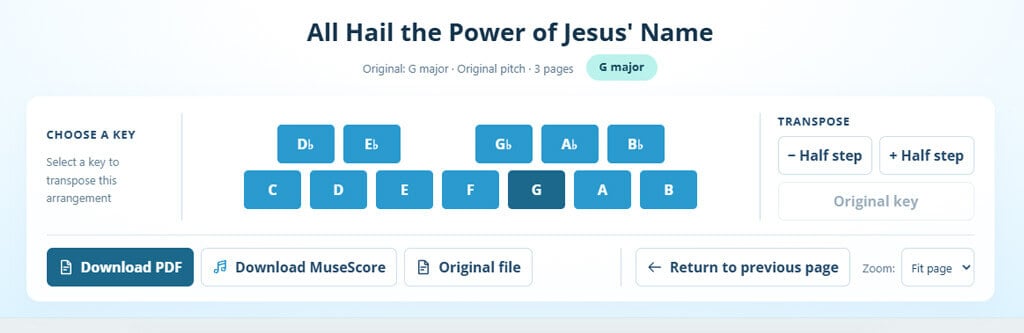
Soon, instead of downloading only a fixed-key keyboard or lead sheet PDF, you will be able to click the TRANSPOSE button. A browser window will open where you can select the key you need from the keys most commonly used by worship teams. Here’s what it looks like:
In other words, two dreams I have had for years were fulfilled in a single day!
The first prototype is now available for All Hail the Power 2026. Log in to Hymncharts or Worshiphymns, try it for yourself, and help me find any glitches.
After you’ve played with it a few days you might have some suggestions worth implementing. In the meantime I’ll start preparing the Christmas music with these exciting new features!
P.S. Finale files aren’t going away. For all the die-hard Finale fans out there who will never stop using Finale (I’m one of you!) I’ll continue to provide Finale files for my new arrangements. I’ll always create new arrangements in Finale 2000 (yes, my 26 year old version of Finale still works fine!) and then have my software convert it into MuseScore.

43 Million Streams



5 Comments. Leave new
What is the “prompt” you gave CODEX? Did it create a .dmg file?
I’m VERY interested in any information you may share for Mac users. Thank you.
The prompt was nothing fancy in itself, basically “code software that will convert my Finale files to Musescore where the sheet music looks exactly the same.” However, the trick was that I gave it several examples of what the Finale files look like – the PDF sheet music renders of the Finale files. That way it had something to reference. My first attempt was with my new arrangement of the Doxology and it rendered it nearly perfectly – text annotations like “unison” etc. were off and I have to manually adjust that. Then as I progressed to converting my older and more complex arrangements (SATB, instrumental parts, etc.) some would NOT convert and had errors. In these cases, CODEX would identify why the sheet music did not convert, fix it, and integrate that glitch into the software. It’s been doing this with me for the past few weeks, learning my different formats. I have no idea what the files it has created are – the folder in which this software resides is, at this writing, 8.21 GB! Here’s an example of what it fixed. Some of the tied notes resulted in little tiny ties that didn’t connect to the next note. Here’s what CODEX reported and fixed:
The tiny curves came from my converter’s handling of different pitches:
– Before measure 17, the notes are C → C. It correctly created a full tie.
– Before measure 14, they are C → B-flat. It incorrectly substituted a short, unattached curve.
Your Finale file stores both using tie markings. I now preserve the different-pitch curves as full editable slurs, keeping both notes sounding correctly.
So little things like that have to be checked and fixed, and once fixed are then a standard part of the conversion software. The problem here was Finale treats note ties differently than MuseScore. Once I pointed it out, CODEX now can adjust for it.
I’m working on Windows 11, and I’m using the software personally to convert my own files so I’m not concerned with compatibility like Maestro is. CODEX would simply code it for you on a Mac.
Here’s a Musescore XML export imported into a fresh install of Dorico SE. Literally horrific. My Finale XML opened in Musescore was infinitely better as is Maestro’s XML import (the new Finale clone.)
To your first quote from James B, Dorico SE is also free, so people could use files you’d created anyway – and there’s an upgrade path for far more features in Dorico Elements and Pro if necessary – and loads of help online to learn Dorico if needed eg https://blog.dorico.com/getting-started/
Thanks, John! That’s true, and Dorico SE is a terrific program. But I got burned before with a free tier. The free Finale Notepad wouldn’t properly open some of my older arrangements. There’s always a chance my files use some feature the free edition handles differently and I’d rather not gamble on that. MuseScore is the full program, free for everyone, so what I see is exactly what my subscribers see.
But here’s the BIG thing for me: I need to display the sheet music right in the subscriber’s browser. With MuseScore files, I built a transpose tool on my site where you pick a key and watch the chart change before your very eyes. No software and no download. Just open the page and go!
As far as I know, Dorico can’t do that. A while back, your team mentioned on your forum that you’d explored browser-based score display with a PhD student, but you’d also have to figure out the business model for hosting scores online. Here’s the thread: https://forums.steinberg.net/t/rendering-dorico-in-the-broswer/160188
And for my subscribers who want to go beyond simply transposing and want to edit the sheet music, MuseScore is about as easy as it gets. No account and no activation, just download and install the software.
Seeing and transposing the music in a browser is the deal-breaker for me. That’s why I went with MuseScore.